Smart Community: 6 Device Types, One Clear Connectivity Guide
A smart community retrofit involves hundreds of terminals across access control, surveillance, metering, EV charging stations, elevators, and self-service lockers. This article categorizes these six device types by data volume into two groups, comparing network standards, monthly data usage, and deployment considerations for each. It also provides verification methods for traffic, coverage, and management parameters.
Smart community upgrades often involve hundreds of terminals: access gates, video surveillance, smart utility meters, EV chargers, elevators, and locker/vending machines. To save time, property managers frequently connect all devices using a single network method. This results in unused data quotas for metering devices while video services get throttled by month-end. Since these six device categories have distinct networking requirements, the solution is to group them by data volume and configure parameters individually.
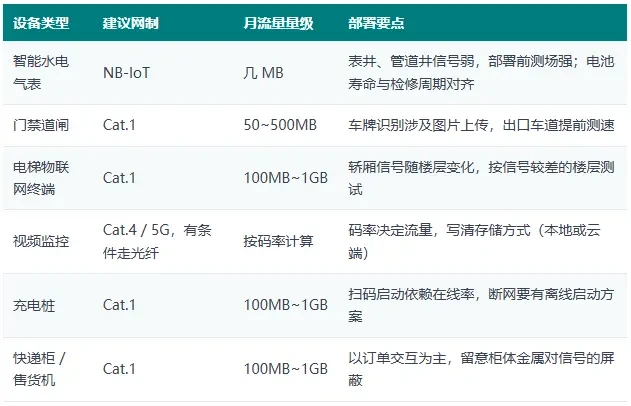
1. Overview: Comparison of Connectivity for Six Device Categories
2. First, group by volume: data scale determines the network architecture
Split the six device types into two groups based on data volume.
Small-traffic always-on clusterSmart water, electricity, and gas meters; access control gates and barriers; elevator IoT terminals. Primarily used for status reporting and command issuance, with daily data traffic ranging from tens of KB to several MB. NB-IoT offers deep coverage and low power consumption, making it ideal for metering devices. Access control and elevator systems require more frequent interactions, so Cat.1 is a better fit.
On-demand high-bandwidth provisioning: Video surveillance, charging piles, and self-service lockers. Video billing is based on bitrate: continuous upload at 1 Mbps for a day consumes approximately 10 GB, totaling just over 300 GB per month; motion detection can reduce this by an order of magnitude. For multi-camera setups, use Cat.4 or 5G; where feasible, deploy fiber optics with 4G as a failover backup. Charging piles and lockers primarily rely on QR code scanning and order interactions, typically using between 100 MB and 1 GB monthly; Cat.1 is sufficient.
3. Refine parameters: traffic, coverage, management
For trafficEstimate based on per-unit limits and include a 20% buffer. For video solutions, specify bitrate and storage method—traffic for local storage with backhaul can differ by several times from direct cloud transmission using the same camera.
OverwriteUnderground garages, elevator cars, and meter shafts are high-risk areas for weak signal coverage. Conduct a field strength test before bulk deployment to avoid retrofitting signals after installation.
ManageConsolidate hundreds of SIM cards into a single backend, organized by device. Track real-name registration, expiration dates, and usage anomalies in a central ledger. Do not distribute cards across individual teams.
There's no one-size-fits-all answer for Class 6 devices, but there is a unified approach: first segment by data volume, then address traffic, coverage, and management for each category. Get the method right, and the solution becomes clear.
Need global IoT SIM pricing comparison or selection advice?
Tell us your target country and device usage, and we'll compile the corresponding pricing plans and recommendations for you.
Related Reading
- For shared power bank expansion overseas, evaluate the target country and backhaul routing first.Tech News · 2026-11-16
- Can legacy devices that only support 2G still use IoT SIM cards?Tech News · 2026-11-16
- Annual procurement locks unit price and total volume, not the entire package.Tech News · 2026-11-16